

Folder Iconizer 1.4
Folder Iconizer is useful to change the computer folders as well as file icons
Program info
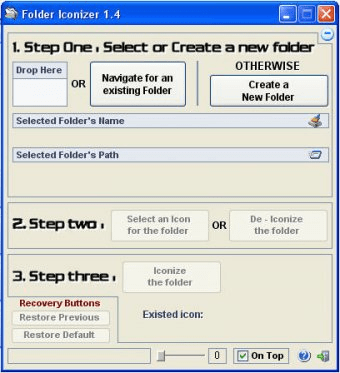
Folder Iconizer is a very small and useful software that uses a three step wizard to facilitate its users to change the computer folders icons as well as file icons. The software has a very intuitive, user-friendly interface which guides the users through a well directed three step wizard which enables users to select the Folders to be iconized or create a new folder. The next step deals with the selection of a desired icon for the folder or de-iconing a previously iconized folder. Last step is the final step where the iconizing process is successfully completed. The main advantage of using the Folder Iconizer software is that the process of iconizing a particular folder is made much simpler to be implemented, allowing the user to drag and drop the desired folder. Moreover, The Folder Iconizer software also allows its interface to be altered in terms of its transparency level which can be changed by the help of a slider provided on the bottom of the software interface. It also contains ‘On Top Checkbox’ that, when checked, makes the Folder Iconizer's window to be always On Top of all other running applications.
Pros
- Free
- Intuitive Interface
Cons
- None in particular
Details
Extensions

No information available
The data will be available later.Old versions

No information available
The data will be available later.Awards

Related software

It helps you replace the traditional drive icons with some more modern ones.


Cursor FX is a program which customizes the appearance of your cursor.
Related stories
See all
Users have reported that the latest Windows 10 update has deleted file from their PCs. Microsoft is looking into the matter and has decided to temporarily pause the updates.
Microsoft is testing the display of ads and promotions in the File Explorer app.
Reclaim your space with one of these must-have duplicate file finder and remover solutions.


Comments